Performance impact of datapacks

And why you should avoid them
What are datapacks?
Datapacks are a way to distribute modifications to the game, without truly modifying anything or touching
any kind of Minecraft code.
Datapacks are an amazing way to create customized experiences like adventure maps, which I'm personally a big fan of, as
you can share your map with a resourcepack and datapack what will be loaded automatically by your game.
Because datapacks do not contain any sort of code, datapacks are completely safe to use and distribute, and do not
require the user to install any sort of mod loader like Fabric or Forge.
They only need to place the datapack in their datapacks folder, and start playing.
What can a datapack do?
As the game becomes more data-driven on each version, datapacks are more powerful on every release.
Just to mention a few, datapacks can provide terrain generation declarations, making it possible for Minecraft
to completely change the world generation.
They can also add custom recipes, which are loaded directly into the registry, making them behave like any
other vanilla recipe do.
And they can add custom behavior, which is where the problem with datapacks start, because the custom behavior is
done through commands.
Function files
Datapacks can declare a file with a .mcfunction extension, which allows them to create functions and tick loops
using commands.
The problem with commands is that, the game itself has to do the entire work, from parsing, interpreting and making the actual
calls. Also, since they're not code, Java does not compile nor optimize them in any way, which means a heavy command will
always have a huge performance impact, regardless of warmup on the JVM.
Some targets are specially heavy, specially the entity targeters @e which requests the entire entity pool in the whole world
and only after that, applies any sort of filter that was provided.
Performance hit
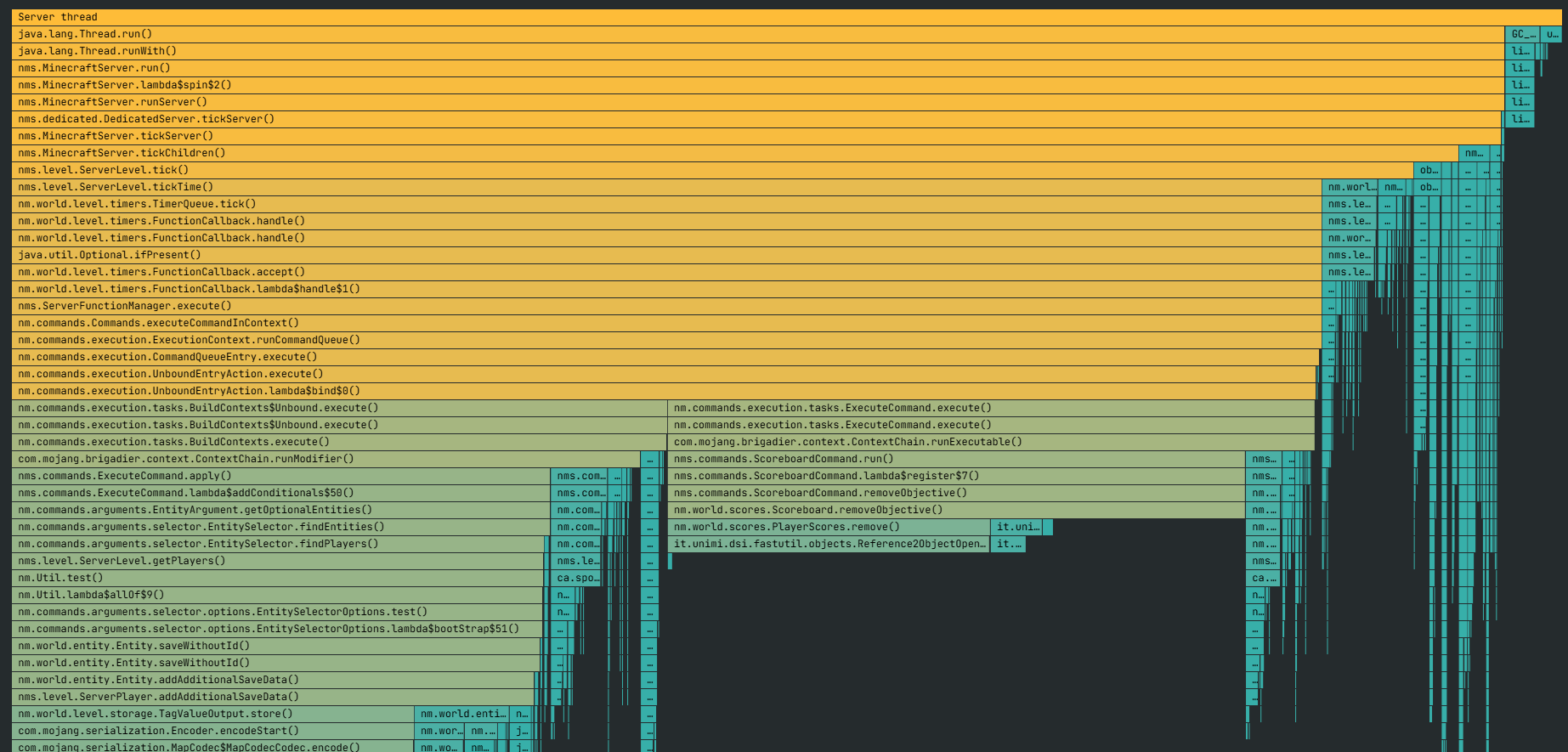
Below you can see a flame graph in spark of the impact a datapack can have on a server.
The larger a block is horizontally, means the server is dedicating more time to said task, in this case see there's a
huge block starting at nms.level.ServerLevel.tickTime(), focus a little below that at nms.ServerFunctionManager.execute(), that is
a datapack!
It is taking more than 80% of the time horizontally, which means the server is wasting 80% of its time processing whatever the datapack
is doing, instead of processing entities, items, etc.
If you were inside the server, you'll notice mobs moving extremely slow due to this.
What do I do?
Simply put, if performance is your first concern avoid datapacks at all costs.
Even if performance is not your priority, unless you're going to just play with a single friend, it would be best to just avoid
future problems by not including datapacks in your server.
Datapacks are also hard to fully remove, as markers, interactions
and displays will not be automatically removed when you remove the datapacks.
Alternatives to datapacks
Use plugins or mods!
The only real scenario where datapacks make sense are on vanilla servers or adventure maps. If you're running Fabric, Forge, Paper or
any other platform, use the content intended for said platform.
For world generators, be Overworld, Nether or the End, try using Terra, Iris or TerraformGenerator instead. All are amazing for world generation, and Terra in particular supports custom world generation for all three dimensions.
For any sort of custom item in Paper servers, use CraftEngine or any of its competitors.
In Fabric/Forge there are plenty of alternatives, which makes it impossible to recommend one, just look up in Modrinth.
For structures in Paper, give Structory a look.
You can create your own structures or just any structure you might have copied from a different map with WorldEdit.
Again, in Fabric/Forge there are a ton of good alternatives for me to just mention a few.
Datapacks disguised as mods
If you're running a Fabric/Forge server, you might think "Maybe I can just run the mod version of this and be safe".
All the datapacks I've seen so far that include a mod version, only use the mod as a sort of wrapper to load the datapack.
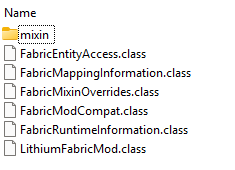
For example, try opening a proper mod using any file explorer that supports ZIP files (Yes, .jar files are actually .zip).
In this example I will use Lithium, and navigate through the entire zip and will only find assets files like JSON, PNG, Manifest; and
proper compiled java classes, which have the extension .class.
The below screenshot belongs to the path /net/caffeinemc/mods/lithium/fabric/.
Now, I will use Incendium, which has a datapack version and a mod version listed in Modrinth.
I will be using the 5.3.5 version of Incendium, but this can be tested with any other
mod version. You can also pick any datapack that has a mod version.
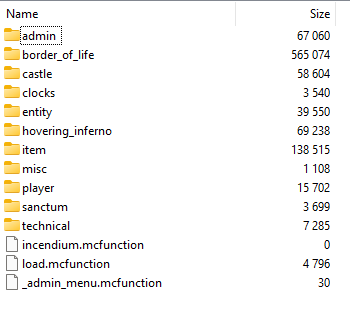
If you open it up, it will look like a regular fabric mod, until you start opening folder, and will eventually find a lot of
datapack related files, with the extension .mcfunction, which are exactly the kind of file that put a lot of stress under your server.
The below screenshot belongs to the path /data/incendium/functions/.
I still want to use a datapack
If you have the time, try opening the datapack and look for any .mcfunction file, if there aren't any, then is safe to use.
If you still want to use it because it adds some cool mechanic, I highly advise you to minimize the number of datapacks, specially
the most heavy ones, which you can try to identify using this tool.